Language Learner
a free Chrome extension that leverages your daily web browsing to help you embark on a seamless, pain-free language learning journey—say goodbye to tackling the frustrations of expensive, clunky language apps.
edtech
chrome extension
personal project
browser extension development
front-end
wireframing
user testing
html/css/js
llm (gpt-3.5-turbo-instruct)
figma
The inspiration behind Language Learner was my mom’s English language learning journey. When trying to help her, I realized that there was a lack of products on the market that satisfied the functionality, usability, and affordability desired. Thus, I set out to create an intuitive yet effective language learning Chrome extension. And so, Language Learner was born.
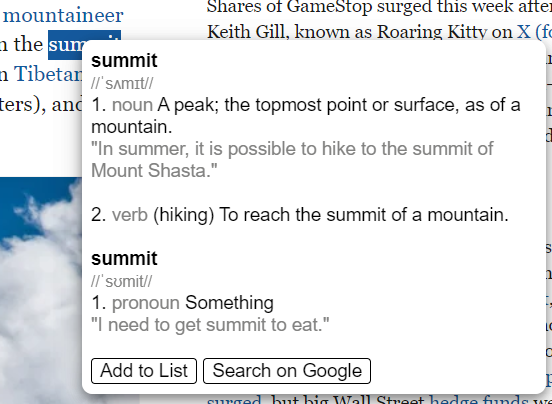
Before starting to code, I sketched a lo-fi wireframe based on the desired features for the minimum viable product (MVP). The MVP would include quick word lookup (where users can double-click a word on any webpage to see its definition pop up), "off-webpage" lookup (where users can search for the definitions of words not found on web pages via the extension’s input box), and “save and organize” (where users can save words and their definitions to their personal vocab list). Nice-to-have features included downloading/exporting the vocabulary list as an XLSX or CSV file, a vocabulary recommendation feature based on currently saved words, and a practice question generator that tested users on the words they saved. These were added in version two.
While I had prior experience with HTML/CSS/JS, I had never created a Chrome extension before. So, the first thing I did was to research how to develop a Chrome extension. I used Chrome for Developer’s documentation to help get me started. An important thing I learned that was especially relevant to this extension is that “content_scripts” allows one to specify files that are “able to read details of the web pages the browser visits, make changes to them, and pass information to their parent extension.”
After I set up my project, one of the main things I had to do was find a way to get the definitions of the words that users double-clicked on. This proved to be difficult as every API I seemed to subscribed to a premium model of pricing and had too few calls allowed for the free tier. However, I finally stumbled upon the Free Dictionary API. Next, to store the words that users saved, I learned how to use the chrome.storage API.
For version two, to create the Vocab Recommender and Question Generator features, I used gpt-3.5-turbo-instruct. I researched how to prompt engineer to get the most optimal responses. In version 2.1, I also added a quality check for the questions generated as I found that sometimes that GPT would generate a question that does not actually test a word saved by the user but rather a synonym, etc.
While I had prior experience with HTML/CSS/JS, I had never created a Chrome extension before. So, the first thing I did was to research how to develop a Chrome extension. I used Chrome for Developer’s documentation to help get me started. An important thing I learned that was especially relevant to this extension is that “content_scripts” allows one to specify files that are “able to read details of the web pages the browser visits, make changes to them, and pass information to their parent extension.”
After I set up my project, one of the main things I had to do was find a way to get the definitions of the words that users double-clicked on. This proved to be difficult as every API I seemed to subscribed to a premium model of pricing and had too few calls allowed for the free tier. However, I finally stumbled upon the Free Dictionary API. Next, to store the words that users saved, I learned how to use the chrome.storage API.
For version two, to create the Vocab Recommender and Question Generator features, I used gpt-3.5-turbo-instruct. I researched how to prompt engineer to get the most optimal responses. In version 2.1, I also added a quality check for the questions generated as I found that sometimes that GPT would generate a question that does not actually test a word saved by the user but rather a synonym, etc.
Language Learner is being used across the world, in many different countries across the globe such as Brazil and Indonesia, as well as the US. Currently there are over seventy users!
undefined